
Patient Toolkit
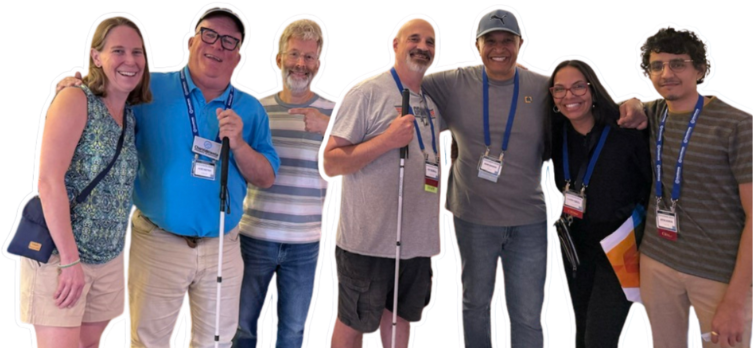
Living with CHM’s progressive vision loss can present challenges, but some can be eased through simple lifestyle adjustments. Below are tips on eye health and daily living, compiled by medical professionals and members of the CHM community.
The CRF consulted several eye doctors about supplements for people living with CHM. Please note: there is no clinical evidence that these supplements specifically benefit CHM, but research suggests they may support overall eye health.
IMPORTANT: Always consult your doctor before starting any supplement regimen.
Supplment | Recommended Adult Dosage |
|---|---|
Lutein | 20 mg/day |
Omega-3 (Fish Oil) | 200 mg DHA + 400 mg EPA/day |
Zeaxanthin | 2 mg/day |
N-Acetyl Cysteine (NAC) | 300 mg twice per day |
The Casey Eye Institute Ophthalmic Genetics Clinic offers the following general nutrition tips to support eye health:
Eat fruits and vegetables rich in lutein and zeaxanthin
Diets high in lutein and zeaxanthin may help protect the macula—the part of the retina responsible for your sharpest vision—from oxidative damage. These nutrients are found in many healthy fruits and vegetables, including peppers, lettuce, asparagus, corn, broccoli, spinach, collard greens, Swiss chard, kelp, and kale.
Because lutein and zeaxanthin are just two of over 600 plant carotenoids, it is recommended to get these nutrients from whole foods rather than supplements alone. Aim to consume approximately 15,000 micrograms of lutein per day from dietary sources.
Eat fish for omega-3 fatty acids
Omega-3 fatty acids found in dark fish may help slow vision loss. The FDA recommends including fish as part of a healthy diet, but certain types of fish are high in mercury and should be avoided by women who are pregnant, may become pregnant, nursing mothers, and young children. These include shark, swordfish, king mackerel, and tilefish. Instead, this group can eat up to 12 ounces per week of lower-mercury fish such as canned light tuna, salmon, pollock, and shrimp. Albacore and steak tuna should be limited to one serving per week. Check local advisories before consuming fish caught by family or friends.
Quit smoking
Cigarette smoke is a major risk factor for macular disease and can worsen retinal conditions. If you smoke, consider quitting. Resources include your physician, the American Lung Association, or the American Cancer Society. Smokers should avoid taking vitamin supplements containing beta-carotene, as it may increase the risk of lung cancer.
Annual Doctor Visit
Visit your eye doctor at least once a year to monitor your vision and eye health.
Wear Sunglasses
Always wear UV-protection sunglasses outdoors. They protect retina cells from glare and harmful rays. Wraparound sunglasses can further reduce reflective glare. Tip: keep sunglasses on until you step indoors to reduce adjustment time to indoor lighting.
Wear a Hat or Cap
A brimmed hat provides shade and reduces reflective glare from sunlight and indoor lighting.
Position Yourself to Reduce Glare
When indoors, sit with bright light behind you. This helps reduce eye strain and makes it easier to see people and objects clearly.
Learn to Ask for and Accept Help
Navigating dark venues, restaurants, or crowds is safer and less stressful when you accept guidance from others. Most people are happy to help, and it’s fine to graciously decline if not needed.
Use a Cane
A cane, including an ID cane, signals to others that you may have limited vision, improving safety for both you and those around you. When traveling, keep a backup cane in case one is lost or broken.
Connect with Other CHMers
Fellow CHMers are an invaluable resource. Reach out via email or CRF social media platforms for tips, guidance, and support. Share your coping strategies so others can benefit as well.
Exercise & Lifestyle
Regular voluntary exercise may help preserve visual function and reduce inflammation, according to research in models of inherited retinal diseases.
Note: Always consult your physician before beginning any new exercise or wellness program.
Exercise and Vision Health
Research in both animals and humans shows that regular exercise supports retinal health and function. Physical activity may help protect against injury, dysfunction, and degeneration in the aging eye.
According to the CDC Physical Activity Guidelines (2018), adults should aim for at least 150 minutes of moderate-intensity aerobic activity per week and include muscle-strengthening activities on two or more days.
What the Research Shows
Animal Studies
- Photoreceptor Degeneration (rd10 model): Mice that performed voluntary running showed significant preservation of visual acuity and photoreceptor cells compared to inactive mice. View Study – Investigative Ophthalmology & Visual Science
- Light-Induced Retinal Damage (LIRD): Mice that exercised aerobically had twice the retinal function and photoreceptor cell count of inactive mice exposed to bright light. View Study – Journal of Neuroscience
- Glaucoma: Older mice that swam 60 minutes per day, 5 days a week for 6 weeks, showed optic nerve resilience similar to that of young mice. View Study – Neurobiology of Aging
- Diabetic Retinopathy: In diabetic rats, treadmill running (30 minutes per day, 5 days a week) helped delay or prevent ocular complications. View Study – Molecular Medicine Reports
Clinical Studies (Human Research)
- Age-Related Macular Degeneration (AMD): A meta-analysis of 9 studies (over 38,000 participants) found that moderate physical activity—about 3 hours per week—was linked to a reduced risk of both early and late AMD. View Study – American Journal of Ophthalmology
- Glaucoma: Aerobic exercises like jogging, cycling, and walking have been shown to reduce intraocular pressure (IOP) in patients with glaucoma. View Study – National Institutes of Health
Easy At-Home Exercise Resources
Try these short, low-impact workouts designed for safety and accessibility:
Acknowledgment
The CRF thanks Dr. Katie Bales for her time and work in creating this valuable information for our members and the CHM community.Progressive vision loss from CHM can create challenges in daily life and at work. Fortunately, many technologies can help improve independence and productivity. Adaptive software, smartphones, and smart devices now offer powerful accessibility tools.
Featured Resource
Computers and Tablets
CHMers often experience challenges such as tracking the cursor, glare-related eyestrain, poor contrast, and unreadable font sizes. Many of these can be addressed with built-in accessibility features or specialized software.
Relumino - Samsung TV's
If you have a vision impairment or experience difficulty when viewing TV programs or content using HDMI inputs, you can use Relumino Mode on your Samsung Smart TV. This feature increases the screen’s contrast and brightness while emphasizing the outlines of images and shapes, so you can watch shows and other content more clearly.
Note: Relumino Mode is available on Samsung Neo QLED TVs, and QLED TVs (model Q80C and above).
Audio Vault
Audio Vault is an excellent online resource that hosts audio description (AD) tracks—narrated versions of movies and TV shows that describe key visual elements for people with vision loss.
The site offers a wide selection of AD tracks for many recent movies and TV series. While older titles may not be available (as descriptive audio wasn’t always produced), the collection continues to grow thanks to community contributions.
You’ll need to create a free account to download tracks, and there are daily download limits to ensure fair use. Donations are also accepted to help keep the site running.
How to Search and Download AD Tracks
- On the main page, you can browse directly through featured titles or use the View All Movies or View All TV Shows links.
- Use the Search box to find what you’re looking for—just type a word from the title (for example, “Spinal” for This Is Spinal Tap) and press Enter.
- Results appear in a table format. Select the Download link next to your chosen title to download the MP3 file.
- Once the download is complete, you’ll find the file in your browser’s usual Downloads folder.
Tips for Screen Reader Users (NVDA or JAWS)
- After selecting View All Movies or View All TV Shows, press Ctrl + Home to move to the top of the page.
- Press E twice to move past the date filter and into the search field, then press Enter to activate it.
- Type your search keyword and press Enter again.
- When you hear the beep indicating search results, press T to jump into the results table.
- Use standard table navigation (Ctrl + Alt + Arrow keys) to locate your title. Move to the Download link and press Enter to start the download.
Your AD track will download as an MP3 file and can be played with any standard audio player.
Windows
Windows includes basic accessibility features, but many users benefit from third-party software:
- JAWS (Freedom Scientific) – Screen reader
- MAGic (Freedom Scientific) – Screen magnification
- ZoomText (AiSquared) – Magnification and screen enhancement
- Dragon (Nuance) – Speech-to-text
For help with Microsoft Office or Windows accessibility:1-800-936-5900 (Mon–Fri 6 am–10 pm PST; Sat–Sun 7 am–6 pm PST)
Apple
Apple products offer extensive built-in accessibility features, making them a strong option for CHMers. Helpful tools include:
- Smart Invert Colors
- VoiceOver (screen reader)
- Customizable fonts
- Zoom
- Accessibility shortcut key
For Apple Accessibility Support:
- United States: 1-877-204-3930
- United Kingdom: 0800-107-6285
- Australia: (61) 1-300-365-083
- China (Mandarin only): 400-619-8141
Apple also provides a dedicated help center for accessibility support with iPhone, iPad, iWatch, and MacBook devices.
Low Vision and Blindness Devices
Smartphones
Smartphones are game changers for people with low vision, bringing accessibility wherever you go. iPhone is widely recognized as the leader in accessibility, but many third-party apps are available for both iOS and Android.
Sighted Assistant Apps
These connect you with a sighted person who can provide real-time assistance through your phone’s camera:
- Be My Eyes – Free app connecting you with volunteers who describe objects or surroundings.
- Aira – Connects you with trained guides for navigation or object identification. Free for short calls and in some airports; subscription required for extended use.
- Lazarillo – Provides real-time audio guidance in cities and buildings, plus accessible shopping and notifications.
In-Phone Assistance Apps
These apps use your phone’s own technology:
- KNFB Reader – Reads printed documents aloud.
- Seeing AI – Free Microsoft app that reads text, identifies currency, barcodes, handwriting, and more.
- DocsToGo – Adjusts text size in documents and PDFs without losing formatting; useful for presentations.
- Night Vision – Enhances light in dark areas using your phone’s camera.
- Flashlight – A simple but essential tool for many CHMers.
Smart Home Controllers
Devices like Google Home and Amazon Echo serve as both smart speakers and home control hubs. By voice command, they can:
- Turn lights on and off
- Adjust thermostats
- Lock doors
- Make coffee
- Play music, news, or weather
- Control TVs and other connected devices
Multiple units placed in different rooms provide seamless accessibility throughout the home.
Wearable Devices
Ray-Ban Meta AI Glasses
These smart glasses can include prescription or sun-protection lenses. With a built-in camera and smartphone connectivity, they allow you to:
Future of Wearables
Adaptive Technology Podcasts
Explore these podcasts for the latest in accessibility and assistive tech:
- Double Tap
- Access Tech Live
- Shawn of the Shed
- Apple vis (about iOS & Apple tech)
- Living Blindfully
- The Eye on the Cure from FFB
- Freedom Scientific Training (intended for accessibility trainers, but a good listen)
- Freedom Scientific FSCast, from the creators of JAWS
- Technically Working
- The Tech Doctor
- The Echo Tips (for those with Alexa or Echo devices)
- On Tech & Vision, hosted by the Lighthouse Guild
OORion App
OOrion is designed to help people who are blind or visually impaired navigate and interact more independently with their surroundings. It supports everyday use as well as experiences in public spaces.The app allows users to virtually tag locations, receive voice-based information about their environment, and access guidance that enhances orientation and independence. It can be used in a variety of settings, including at home, in hotels, restaurants, and other public or shared spaces.
Highlight Your Mouse Pointer Using Microsoft PowerToys (Windows)
Microsoft PowerToys includes built-in mouse tools that can make your cursor easier to see during screen recordings, training videos, or presentations—no IT permissions required.
1. Install Microsoft PowerToys
Download and install PowerToys from the Microsoft Store: Microsoft PowerToys
2. Open PowerToys
Launch PowerToys from your Windows Start Menu
Open the PowerToys Settings window
3. Enable Mouse Utilities
In the left-hand menu, select Mouse Utilities
Toggle the feature ON
4. Use “Find My Mouse”
Press Ctrl twice
Your screen will dim and a spotlight will appear around your mouse pointer, making it easy to locate instantly
5. Use “Mouse Highlighter”
Press Windows + Shift + H to turn it on
A colored highlight will appear around your cursor when you click and move the mouse
You can customize:
Highlight color for left-click vs. right-click
Size and appearance of the highlight effect
A key part of maintaining independence while living with CHM’s vision changes is learning to adapt your environment—especially at home. The main challenges are lighting and contrast. Some solutions are simple, while others may require professional support. Here are options that fellow CHMers have found helpful.
Adjust the Lighting
- Add floor and table lamps in living areas, bedrooms, and the kitchen.
- Use 60–100 watt bulbs and replace them regularly.
- Install adjustable blinds or sheer curtains to allow natural light.
- Try different types of light (halogen, fluorescent, incandescent, LED) to see what works best—note that fluorescent lighting can bother some people with low vision.
- Keep a flashlight or keychain light nearby for nighttime use.
- Ensure hallways are evenly lit so you can see where they curve or end.
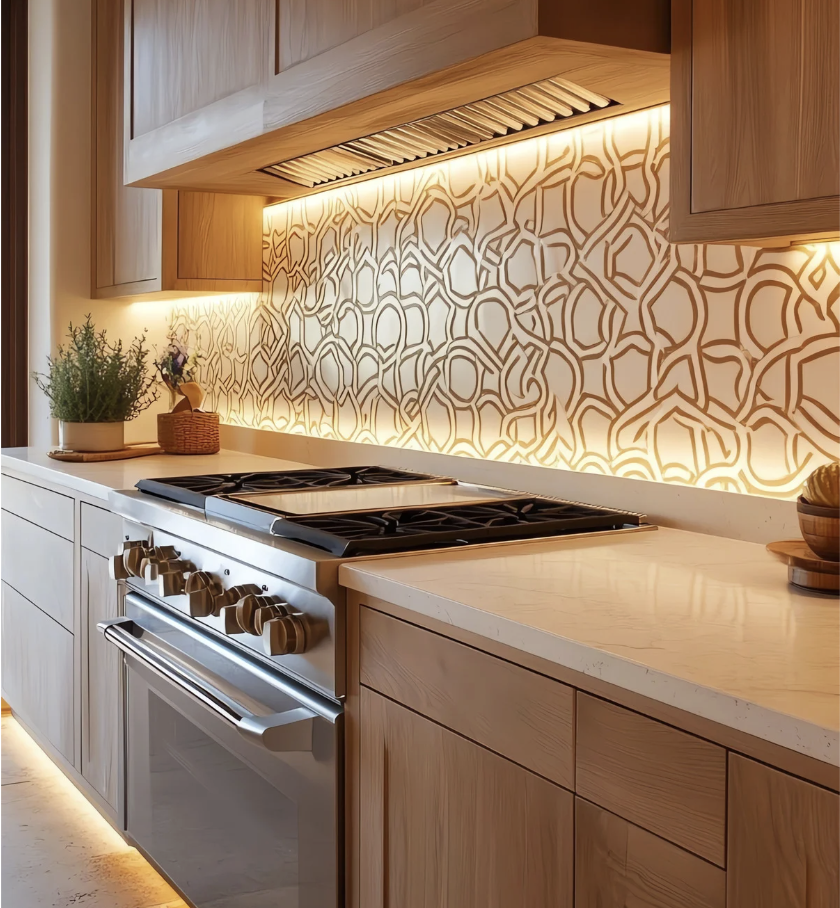
Kitchen Lighting
Well-lit work surfaces make cooking safer. Adding under-cabinet LED lighting can help. DIY kits are available, or you can hire an electrician.
Kitchen Contrast
Contrast is key in the kitchen. Consider:
- Cutting boards: Use white and dark options (e.g., chop onions on a dark board).
- Tools and knives: Choose colors that contrast with countertops.
- Measuring cups: Large-print versions in clear or bright colors improve readability.
- Plates: White plates with wide colored borders make food easier to see.
- Avoid clear glassware, which is harder to detect.
Rearrange the Furniture
- Position mirrors to reduce glare.
- Place chairs near windows for natural light.
- Group furniture closely for easier conversation.
- Select textured upholstery to distinguish pieces.
- Use brightly colored lamps or vases near key items to improve visibility.
Eliminate Safety Hazards
- Keep chairs pushed in—make it a household rule.
- Clean with non-skid, non-glare products; avoid wax on floors.
- Remove low coffee tables and end tables that create trip hazards.
- Secure or reroute electrical cords.
- Tape down rugs and replace worn carpeting.
- Wipe up spills immediately and keep floors dry.
- Install grab bars in bathrooms and stairways.
- Mark step edges with yellow reflective tape.
- Store fire extinguishers and first aid kits in a consistent, easy-to-access location.
- Use bright, contrasting colors to mark exits.
- Test smoke and fire alarms regularly to ensure they are loud enough.
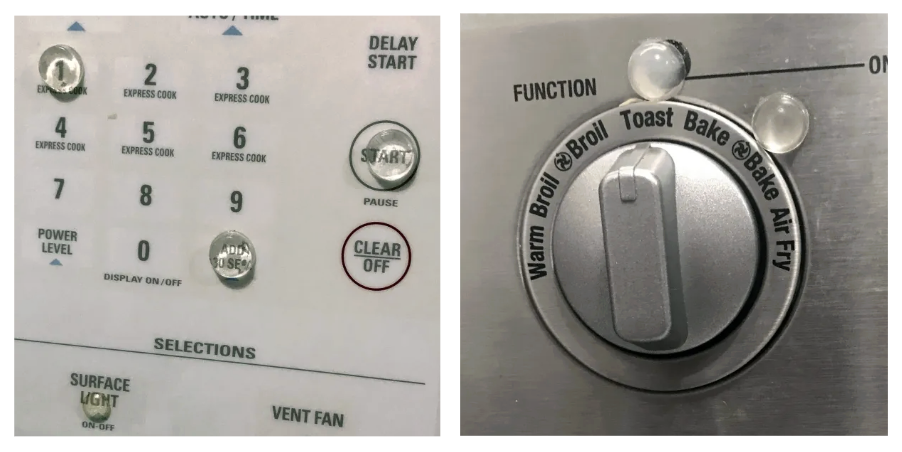
Tactile Bump Dots
Controls on appliances can be difficult to see. Tactile bump dots—small, self-adhesive markers—make it easier to operate devices. Place them on:
- Microwave buttons (e.g., 1 minute and 30 seconds)
- Stove dials
- Washer/dryer controls
They’re inexpensive, available in different colors/sizes, and portable for travel—use them to mark hotel doors, coffee makers, or other appliances.
Formal blind rehabilitation training can take place at different stages of CHM, and in a variety of settings. The goal is to help you maintain independence and safety. Consider the following:
- What daily activities are most affected by your vision loss?
- Which environments or situations do you find most challenging?
- What resources in your community could support greater independence and safety? (e.g., transportation, technology, home or office adaptations)
Professional Instruction
Orientation and mobility professionals can provide training and tools, including:
- Cane training
- Adaptive tools for the home
- Assistive technology
- Computer and phone accessibility adaptations
- Guide dog training
Choroideremia (CHM) may limit some career options, but it does not limit your potential for a successful and fulfilling life. Many people with CHM thrive in a wide range of professions.
Career Support
- CRF encourages career counseling through public services and local advocacy organizations.
- Some of the best advice comes directly from others living with CHM. Visit our Support section to connect with peers.
- Today’s technology and adaptive tools make it possible to pursue nearly any career.
Examples of Careers Held by People Who Are Blind or Visually Imparied
This list is not exhaustive, but highlights the variety of professions CHMers have pursued:
- Educators: teachers, college professors, guidance counselors
- Health and wellness: doctors, nurses, occupational and physical therapists, masseuses, chiropractors
- Mental health and social services: social workers, psychologists, rehabilitation teachers and counselors
- Creative fields: freelance writers, journalists, broadcasters, DJs, musicians, authors, artists, photographers
- Leadership and public service: attorneys, judges, politicians, executive directors, managers, motivational speakers
- Sports and recreation: coaches and athletes
- Culinary and design: chefs, architects
- Technical and scientific fields: researchers, engineers, scientists
- Customer service and trade work: customer service representatives, restaurant and store staff, factory workers
Job Seeker Resource
Career Connect is a resource for people who are blind or visually impaired looking for career guidance and opportunities.
Approximately 2.2 billion people globally live with some form of near or distance vision impairment, according to the World Health Organization (WHO).
Many government entities recognize “legal” or “statutory” blindness as a qualified disability. People who are blind may also be able to receive disability benefits while continuing to work.
Why Disability Benefits Matter
- Provide financial support
- Offer access to occupational rehabilitation, including retraining for new professions
- Allow workers who are blind or visually impaired to continue employment while receiving monthly benefits
Navigating the Process
Applying for and receiving disability benefits can take time and patience. Talking with your doctor can help you navigate the process.
Living with CHM’s progressive vision loss not only affects daily routines and independence—it can also impact emotional well-being. Feelings of anxiety, frustration, sadness, or uncertainty are common and completely valid. Taking care of your mental health is just as important as managing physical changes.
Coping Strategies That Can Help
Many CHMers have found strength and resilience by:
- Counseling or therapy: Talking with a licensed mental health professional can provide strategies for coping with vision loss and related stress.
- Peer support: Connecting with others who share similar experiences through support groups or the CRF community.
- Mindfulness practices: Meditation, breathing exercises, and yoga can help reduce anxiety and improve focus.
- Healthy habits: Regular exercise, balanced nutrition, and good sleep routines are all linked to better mental health.
- Creative outlets: Writing, art, or music can provide expression and relief.
- Staying socially connected: Maintaining friendships and relationships prevents isolation and strengthens support systems.
Resources
If you are struggling with your mental health, there are organizations that can help:
- Mental Health America – Information, resources, and screening tools.
- Foundation Fighting Blindness – Licensed therapists trained to work with the blind/low vision community.
- National Alliance on Mental Illness (NAMI) – Support groups, education, and a helpline (1-800-950-NAMI).
- American Foundation for the Blind (AFB) – Resources for people adjusting to vision loss.
- Hadley – Free workshops and peer-to-peer groups for people with vision loss.
- VisionAware (by APH) – Resources for adjusting to vision loss and finding emotional support.
If you are in crisis or need immediate help, please call or text 988 in the United States to connect with the Suicide & Crisis Lifeline.
Remember
You are not alone. It’s okay to ask for help, and seeking support is a sign of strength. Maintaining emotional well-being is an ongoing process, and finding what works best for you can make a real difference.
If you would like to contribute a suggestion or share your experience, click here to email us.

CRF is registered as a US 501(c)3 nonprofit organization EIN: 04-3511754
Our mission is to raise funds in support of scientific research leading to a treatment or cure of choroideremia, a hereditary retinal-degenerative disease that causes blindness; to educate people affected by the disease; and to inform the public.




©Copyright 2025 The Choroideremia Research Foundation Inc. All Rights Reserved.